Promotions rules model
Comerzzia allows you to define a structure of rules that can be applied:
-
As a condition to access a discount.
-
Select the items that will be used in the calculation of the discount.
-
Point Discounted items.
-
Apply different discounts depending on the calculation.
Each rule is qualified according to the type of discount, being able to generate complex logical structures:
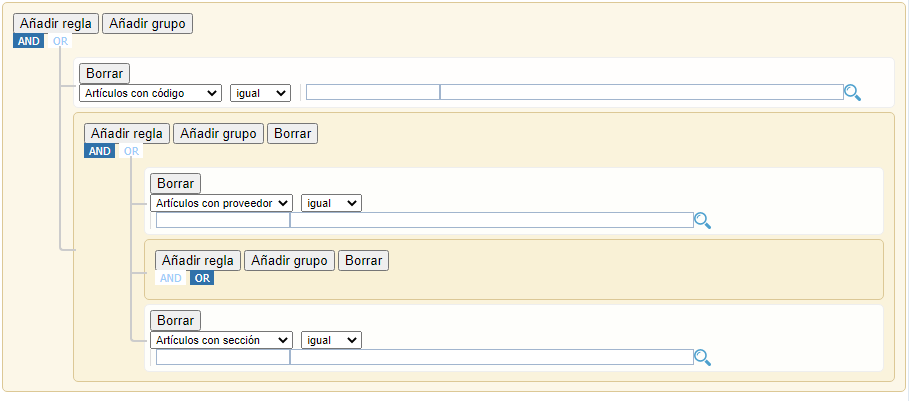

This information, in XML or JSON, must be encoded in BASE64 to incorporate into the promotion.
These structures must be known in order to generate and send the information to comerzzia.
Structure
Rules are defined as alist of conditions (RuleObject) and a logical operator for their combination: AND or OR.
RuleArray – Rule structure |
||
condition |
Text |
AND o OR. Logical operator. |
rules |
List<RuleObject> |
List of rules |
RuleObject – Rule |
||
condition |
Text |
AND o OR. Logical operator if new rules are included in the rules field. |
des |
Text |
Description of the rule. Example: COCA COLA, the brand description. In the case of application definitions**, this field is used to define the amount of the discount. |
field |
Text |
Field to which the rule applies ** |
id |
Text |
Identifier of the field to which rule rule applies ** |
input |
Text |
Input type, whether it is a text field or a selector * Examples: select, text |
operator |
Text |
Rule condition, values: equal, greater, less, less_or_equal, greater_or_equal, begins_with, not_begins_with |
rules |
RuleArray |
Optional. If the rule nests another rule group. |
type |
Text |
Property data value type * Examples: string, integer |
value |
Text |
Rule value ** Examples: 0301, the brand code, L |
IMPORTANT:
The fields marked with an asterisk (*), are closely related to the promotion generation assistant of the comerzzia backoffice. In order to use the management of backoffice promotions, its logic must be respected. Field type, value type.
Fields marked with two asterisks (**) must respect the nomenclature of comerzzia.
Field-id |
Type |
Values |
Condiciones para la cabecera |
||
DIA |
Day of the week Input: select Type: string |
L – Moons M – Tuesday X – Wednesday J – Thursday V – Friday S – Saturday D - Sunday |
HORA |
Hour Input: text - Type: datetime |
HH:MM |
COLECTIVO |
Groups associated with loyalty Input: text - Type: help |
Collective identifier |
ETIQUETAS_FIDELIZADOS |
Tags associated with loyalty Input: text - Type: help |
The identifier of the tag. UID tag. |
IMPORTE-TOTAL |
Import total ticket Input: text - Type: integer |
Numeric value |
Field-id |
Type |
Values |
Condiciones de Línea |
||
ARTICULOS |
The ID of an item. Input: text - Type: Help |
The value of the item code |
PROVEEDORES |
The identifier of a vendor. Input: text - Type: Help |
The value of the vendor code |
SECCION |
The identifier of a section. Input: text - Type: Help |
The value of the section code |
FAMILIAS |
The ID of a family. Input: text - Type: Help |
The value of the family code |
CATEGORIZACIONES |
The identifier of a category. Input: text - Type: Help |
The value of the category code |
MARCA |
The identifier of a brand. Input: text - Type: Help |
The value of the brand code |
ETIQUETAS |
The identifier of a tag. Input: text - Type: Help |
The value of the tag code |
CANTIDAD-UNICA |
Quantity in previous condition (single application) (level 1 only) Input: text - Type: integer |
Value |
IMPORTE |
Amount in previous condition (single application) (level 1 only) Input: text - Type: integer |
Value |
CANTIDAD |
Quantity in previous condition (level 1 only) Input: text - Type: integer |
Value |
IMPORTE-MULTIPLE |
Amount in previous condition (level 1 only) Input: text - Type: integer |
Value |
Application Articles |
||
ARTICULOS |
The ID of an item. Input: text - Type: Help |
The value of the item code |
PROVEEDORES |
The identifier of a vendor. Input: text - Type: Help |
The value of the vendor code |
SECCION |
The identifier of a section. Input: text - Type: Help |
The value of the section code |
FAMILIAS |
The ID of a family. Input: text - Type: Help |
The value of the family code |
CATEGORIZACIONES |
The identifier of a category. Input: text - Type: Help |
The value of the category code |
MARCA |
The identifier of a brand. Input: text - Type: Help |
The value of the brand code |
ETIQUETAS |
The identifier of a tag. Input: text - Type: Help |
The value of the tag code |
Application Range |
||
TOTAL |
Total from which a certain benefit is applied. Input: text - Type: range |
Value that the ticket must meet to benefit from the discount. The "des" field is used to define the discount applied. |
Example – Header conditions
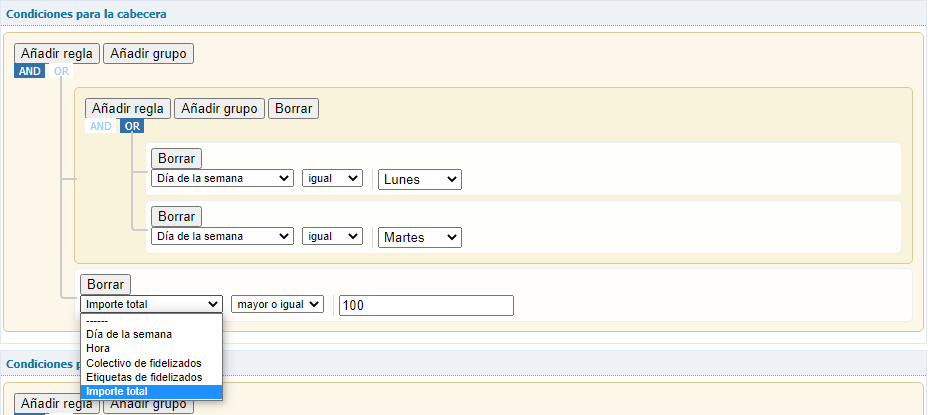
Condition: Ticket amount greater than or equal to 100 And day of the week equal to Monday OR Tuesday.
{
    "condition": "AND",
    "rules": [
        {
            "condition": "OR",
            "rules": [
                {
                    "field": "DIA",
                    "id": "DIA",
                    "input": "select",
                    "operator": "equal",
                    "type": "string",
                    "value": "L"
                },
                {
                    "field": "DIA",
                    "id": "DIA",
                    "input": "select",
                    "operator": "equal",
                    "type": "string",
                    "value": "M"
                }
            ]
        },
        {
            "field": "IMPORTE-TOTAL",
            "id": "IMPORTE-TOTAL",
            "input": "text",
            "operator": "greater_or_equal",
            "type": "integer",
            "value": "100"
        }
    ]
}
<condicionCabecera>
<condition type="string">AND</condition>
<rules class="array">
<rule class="object">
<condition type="string">OR</condition>
<rules class="array">
<rule class="object">
<field type="string">DIA</field>
<id type="string">DIA</id>
<input type="string">select</input>
<operator type="string">equal</operator>
<type type="string">string</type>
<value type="string">L</value>
</rule>
<rule class="object">
<field type="string">DIA</field>
<id type="string">DIA</id>
<input type="string">select</input>
<operator type="string">equal</operator>
<type type="string">string</type>
<value type="string">M</value>
</rule>
</rules>
</rule>
<rule class="object">
<field type="string">IMPORTE-TOTAL</field>
<id type="string">IMPORTE-TOTAL</id>
<input type="string">text</input>
<operator type="string">greater_or_equal</operator>
<type type="string">integer</type>
<value type="string">100</value>
</rule>
</rules>
</condicionCabecera>